
AKAYUKI: Steel Blossoms Red locations: where to go first
Get oriented in the snowy valley, start the dojo tutorial, understand when to visit the forge, and learn what to expect at the arena.
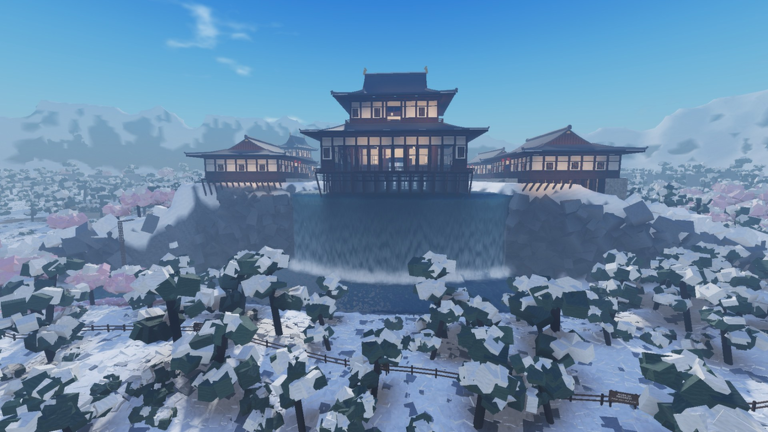
Make the dojo tutorial your first priority. AKAYUKI: Steel Blossoms Red takes place in a snowy Japanese valley with blossom trees and a dojo-castle on a cliff.
| Place | What it is for | Your first useful action |
|---|---|---|
| Dojo | Starting the tutorial | At Step 1/6, walk onto the straw mat with WASD. |
| Forge | Enhancing your blade | Visit as you reach upgrade milestones: a new upgrade is available every five levels, with the maximum upgrade at level 50. |
| Arena | Fighting other players | Enter when you want PvP combat; watch for the “Q lock on” prompt when an opponent is selected. |
Start with the dojo tutorial
The dojo-castle on the cliff is a distinctive valley landmark. The dojo tutorial begins with a card reading “STEP 1/6 — Walk onto the mat.” Move onto the straw mat with WASD to carry out that opening instruction.
The tutorial also recommends using a mouse rather than a trackpad. If the mouse movement needs adjusting, its sidebar points to M → Settings → Mouse Sensitivity. That gives you a specific setting to change before continuing with katana combat.
Once you are in the valley, check the PATH OF THE SWORD tracker. With the dojo tutorial unfinished, it can show 1 / 48 and the objective “Finish the dojo tutorial.” If that is your displayed objective, it identifies the tutorial as your current progression task. The opening tutorial card also has SKIP TUTORIAL and MAIN MENU buttons, so recognize those separately from the instruction to walk onto the mat.
For broader help getting started, see the beginner guide.
Visit the forge as your level increases
The forge is the blade-enhancement destination. Defeating players or enemies earns XP and raises your level; the forge is where you enhance the weapon you use in those fights. The version 1.3.12 upgrade schedule makes a new blade upgrade available every five levels, with the maximum upgrade at level 50. Those milestones give you a concrete reason to return as you progress.
In a separately recorded gameplay encounter, the narrator follows an arrow sign to a sword-forging station. The excerpt does not identify this station as the blade-upgrade forge described above. The heating and hammering sequence described below belongs to that recorded encounter.
In that sequence, moving the blade back and forth heats it. Once it is hot, clicking performs the strikes, and the dots along the bottom show the progress you are working to fill. When the blade cools, it goes back into the heat and is moved or rotated again before hammering continues. Completing the sequence produces an upgraded sword. The heat state and filled dots are the useful things to watch during this encounter.
Keep the blade upgrade levels guide handy when planning your next upgrade.
Use the arena for player fights
The arena is a PvP fighting area where combatants can win and lose successive fights. It serves a different purpose from the dojo lesson: this is where you put your katana fighting into practice against other players.
When an opponent is selected, a “Q lock on” prompt can appear on screen. That is a useful combat cue to recognize once you are facing someone. Arena fighting can also continue during a storm, so stormy weather can be part of the combat scene.
For help with the fighting itself, use the combat guide or the lock-on guide.
What else is in the valley?
Beyond the dojo, forge and arena, the snowy landscape contains blossom trees and other players. Players have visible nameplates, while the kill feed reports kills. These interface elements help you recognize the people and combat activity around you as you explore.
Bonfires also have an exploration role. In versions 1.3.9–1.3.10, the “Blazing” objective asked players to “Light every bonfire on the map.” That objective involved multiple points across the world, extending exploration beyond the three main destinations above.
Family-name rolling is handled through the Character menu. There, players can adopt names of famous historical samurai, with rarer names granting better stat boosts. Use that menu for family rolls, and the family names guide for that part of character progression.
Related Guides
Beginner Guide
Start with the dojo, learn mouse driven sword inputs, and work toward your first blade upgrade and family rolls.
Blade Upgrade Levels
Find every five level blade enhancement milestone through level fifty and learn when to return to the forge.
Permanent Quest Objectives
Start Path of the Sword, read separate quest rewards, and distinguish tracked objectives from Roblox achievement requirements.