AKAYUKI: Steel Blossoms Red codes and how to redeem them
Find the AKAYUKI code lists, learn how to use the Codes menu, and troubleshoot redemption problems.
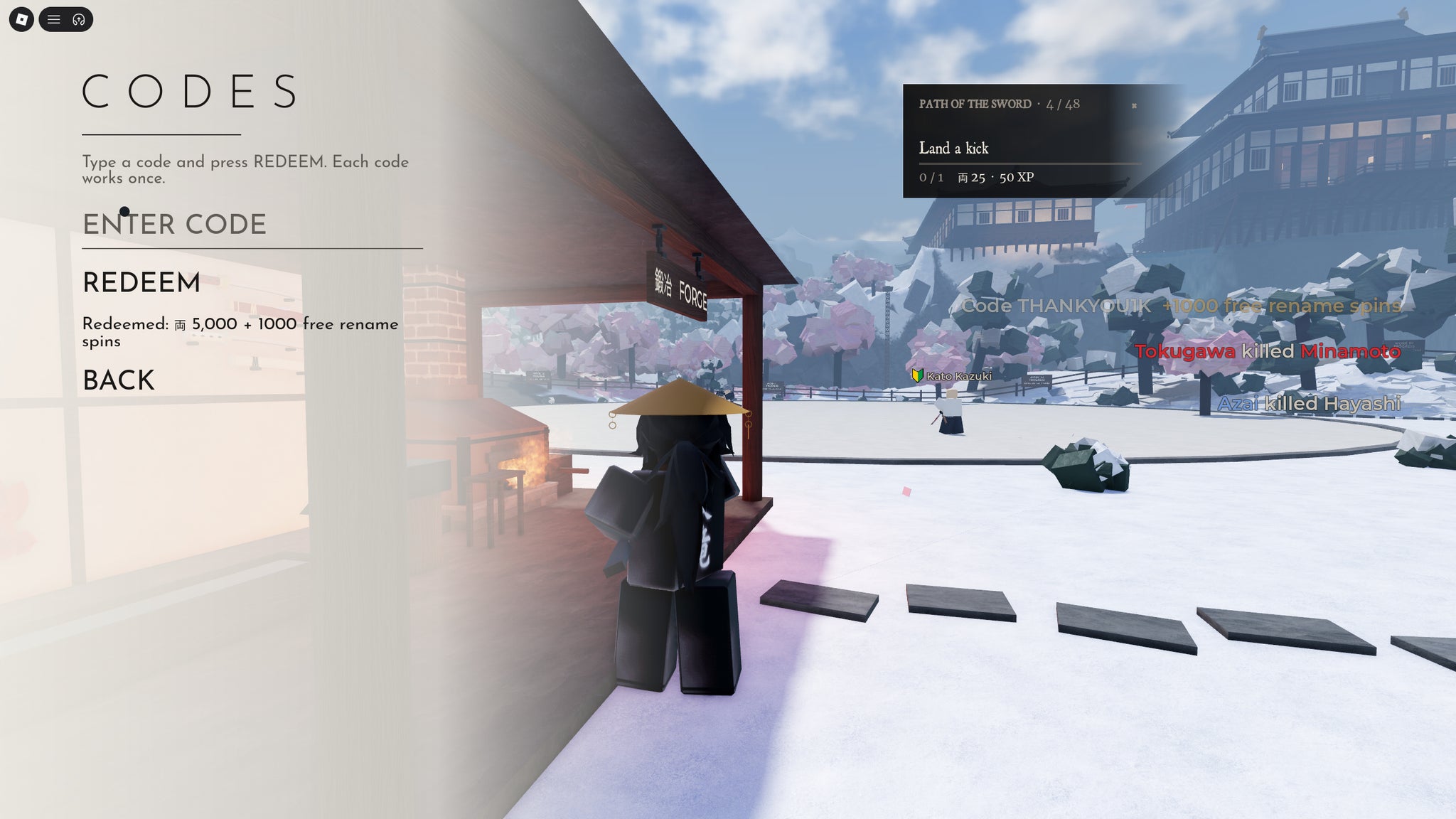
Enter AKAYUKI: Steel Blossoms Red codes in Codes → Enter Code → Redeem from the main menu. If you're already in an arena, press M to open the in-game menu, then select Codes. Each code pays out once per account.
Codes to try
Copy one code at a time from the table, preserving its spelling and capital letters. Reported means a code appears in a source listing; Tested means an in-game redemption has been recorded. A source-check date is not an expiry date or an in-game test date.
Code list at a glance
Current codes
THANKYOU1KSource checked:
AKAYUKITHANKYOUSource checked:
AKAYUKISource checked:
DISCOMEMBASource checked:
SHOGUNATESource checked:
| Code (click to copy) | Rewards | Status | Source checked |
|---|---|---|---|
THANKYOU1K | 5,000 cash1,000 Rename Spins | Reported active | |
AKAYUKITHANKYOU | 1,000 cash100 Rename SpinsXP | Reported active | |
AKAYUKI | 5,000 cash10 Rename Spins | Reported active | |
DISCOMEMBA | Discombobulate katana skin | Reported active | |
SHOGUNATE | Communiblade katana skin | Reported active |
How to redeem a code
- Launch AKAYUKI: Steel Blossoms Red on Roblox.
- Select Codes in the main menu. You can claim rewards there before spawning; if you're already playing, press M to bring up the menu.
- Paste a code into the Enter Code field.
- Press the Redeem button.
A successful redemption shows a reward notification beneath the code bar, or adds the rewards immediately to your inventory. Look for that confirmation after submitting each code before moving on to the next one.
What the rewards help you do
Rename Spins reroll your family name. The names draw from famous historical samurai, and rarer names give better stat boosts. That makes these spins useful for changing the family name attached to your character, with another chance at a rarer result. For more about the names themselves, see the family names guide.
Cash supports blade upgrades at the forge. XP helps with the other side of progression: gaining levels sooner so the next blade upgrade comes sooner. Currency and XP therefore serve related purposes, but they are different rewards—one helps pay for upgrades, while the other advances your level. The blade upgrade levels guide covers that progression in more detail.
The skin rewards give you named katana appearances. If you're looking for a particular appearance, use the skin name in the reward column to distinguish it from a cash or spin bundle. You can also explore the katana skins guide.
If a code does not work
First, check the exact spelling and capitalisation. Pasting a long code such as AKAYUKITHANKYOU helps avoid a missed letter. Also consider whether you have already claimed it: redeeming a code again does not provide another payout on the same account.
For a newly released code, try leaving and re-entering the game, or joining a different server. A new code may work on an updated server even if the server you first joined rejected it. This is a possible fix, not a guaranteed result.
Codes can also expire. Use the status and source-check date in each row when deciding which code to try; an unspecified expiry date does not mean a code will work forever.
Expired codes
Expired codes
HAPPYWEEKEND2Source checked:
HALLOWEENSource checked:
FIRST500Source checked:
TRIPLESPINSource checked:
| Code (click to copy) | Rewards | Status | Source checked |
|---|---|---|---|
HAPPYWEEKEND2 | 2,000 currency200 Rename Spins2,000 XP2× XP for 2 days | Reported expired | |
HALLOWEEN | Free rewards | Reported expired | |
FIRST500 | Free rewards | Reported expired | |
TRIPLESPIN | Free rewards | Reported expired |
Where to find new codes
New codes are announced in the Akayuki Roblox community and the game's Discord server. In Discord, look for the in-game-codes channel. Updates, community milestones and seasonal events are useful times to check for announcements from developer @spidermanguy999.
For the game's community links and channels, visit the Community hub.
Sources and check records
Reported statuses reflect source listings. Tested statuses reflect in-game redemption checks. Source-check dates are shown beside each code.
- Try Hard Guides — Akayuki Steel Blossoms Red codes and gameplay details (Nov 11, 2026)
THANKYOU1K· Source checked:AKAYUKITHANKYOU· Source checked:AKAYUKI· Source checked:HAPPYWEEKEND2· Source checked:HALLOWEEN· Source checked:FIRST500· Source checked:
- RBLXSTAT archived AKAYUKI 1.3.9–1.3.10 description and notes — universe 10771760061
THANKYOU1K· Source checked:
- CodesRush — Akayuki weapon-skin names and community links (Nov 12, 2026)
THANKYOU1K· Source checked:SHOGUNATE· Source checked:HAPPYWEEKEND2· Source checked:TRIPLESPIN· Source checked:
- Akayuki Codes (November 2026)
AKAYUKITHANKYOU· Source checked:AKAYUKI· Source checked:DISCOMEMBA· Source checked:SHOGUNATE· Source checked:HAPPYWEEKEND2· Source checked:
- Pro Game Guides — Akayuki codes, rewards, and character menu (Nov 8, 2026)
AKAYUKITHANKYOU· Source checked:AKAYUKI· Source checked:DISCOMEMBA· Source checked:HALLOWEEN· Source checked:FIRST500· Source checked:TRIPLESPIN· Source checked:
- Destructoid — Akayuki codes, cosmetic items, and codes menu (Nov 11, 2026)
AKAYUKITHANKYOU· Source checked:DISCOMEMBA· Source checked:SHOGUNATE· Source checked:
- Akayuki codes (November 2026)
AKAYUKI· Source checked:HAPPYWEEKEND2· Source checked:HALLOWEEN· Source checked:FIRST500· Source checked:
Related Guides
Family Names and Rolls
Find the Character roll menu, recognize documented family names and rarity examples, and inspect buffs before confirming a result.
Blade Upgrade Levels
Find every five level blade enhancement milestone through level fifty and learn when to return to the forge.
Katana Skins and Codes
Match Discombobulate and Communiblade to their code rewards, recognize alternate names, and check the conditions for receiving them.